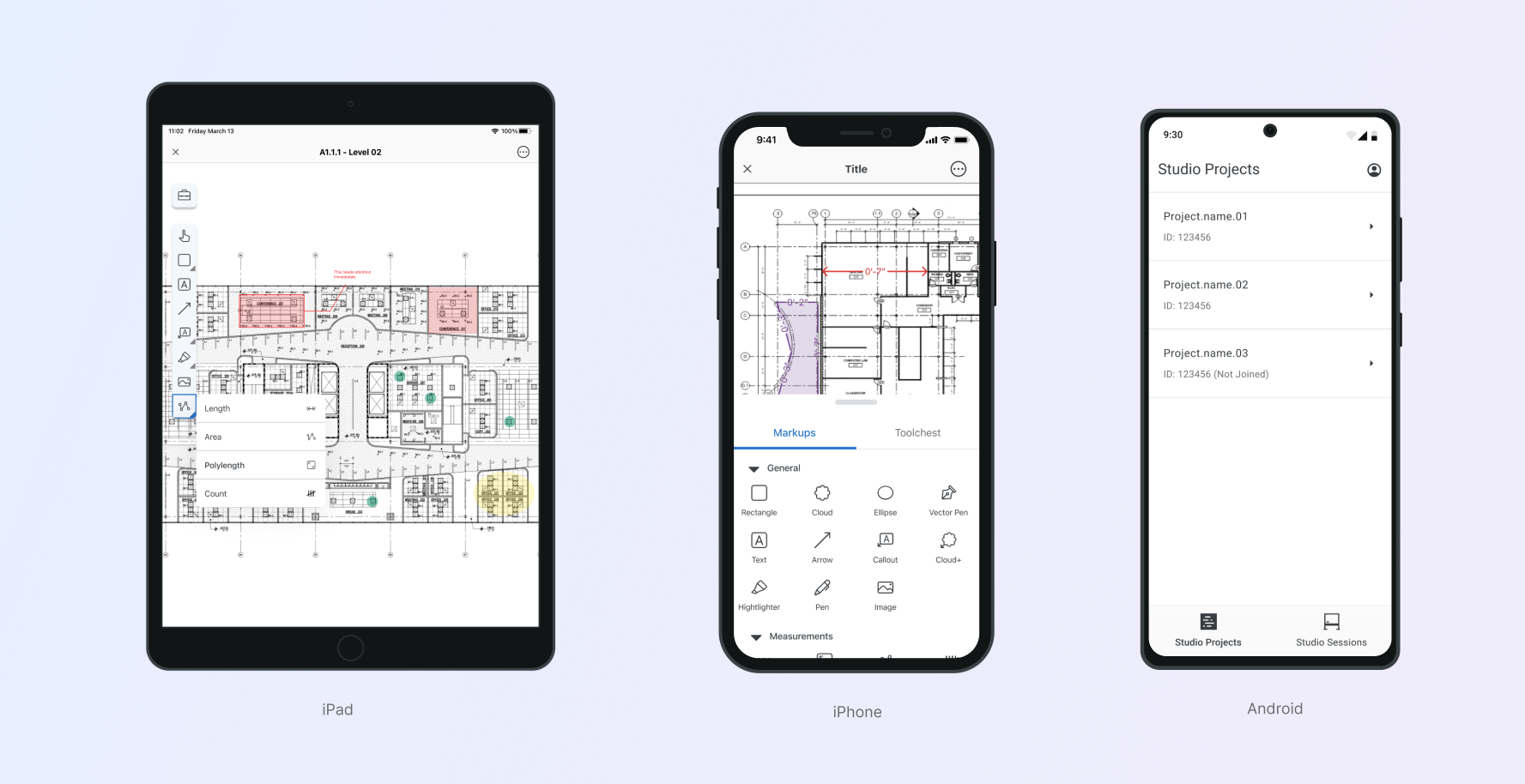
Supporting real-time PDF editing, markup workflows, and cross-platform design systems across iOS and Android.
Overview
During my time at Bluebeam, mobile became an increasingly important part of how users accessed project documents in the field. Construction professionals needed a reliable way to view, annotate, and collaborate on PDFs directly from their phones and tablets, often while offline or on unstable jobsite networks.
Over five years, the mobile product evolved significantly, from an early app focused on field workflows like punch lists and RFIs to a streamlined experience centered around document collaboration, markups, and real-time Studio Sessions.
As the Design Manager supporting mobile, I led design direction, mentored the mobile product designer, and stepped in as an individual contributor when needed.
My Role
Responsibilities included:
- Leading the design direction for Bluebeam’s mobile product strategy
- Mentoring and supporting the dedicated mobile product designer
- Collaborating with Product and Engineering on roadmap decisions
- Contributing hands-on design work during high-demand periods
- Helping establish scalable design systems for both iOS and Android
- Guiding the Android app from 0 → 1, as Bluebeam previously only had an iOS application
- Team partners included Product Management, Engineering, and QA.
The Challenge
Designing for mobile introduced several complex challenges:
- Complex desktop workflows: Bluebeam’s core product is known for powerful markup tools used on desktop. Translating those workflows to mobile required balancing capability with usability on smaller screens.
- Different mobile contexts: Unlike desktop users working at a desk, mobile users often operate in field environments, where speed, clarity, and reliability are critical.
- Platform differences: While the overall product experience needed consistency, iOS and Android users have different expectations based on their platform conventions.
- Connectivity constraints: Many users work in environments with unreliable connectivity, making offline access and sync behavior essential.
Design Strategy: Context Over Feature Parity
One of the key principles we adopted was: design for context, not feature parity.
Rather than replicating every desktop feature on mobile, we focused on what users actually needed to accomplish in the field.
This meant prioritizing workflows like:
- Viewing project documents
- Adding and reviewing markups
- Commenting and collaborating in real time
- Accessing files stored in document management systems
- Working offline when necessary
By focusing on the context of use, we were able to create a mobile experience that felt purposeful instead of a compressed version of the desktop application.
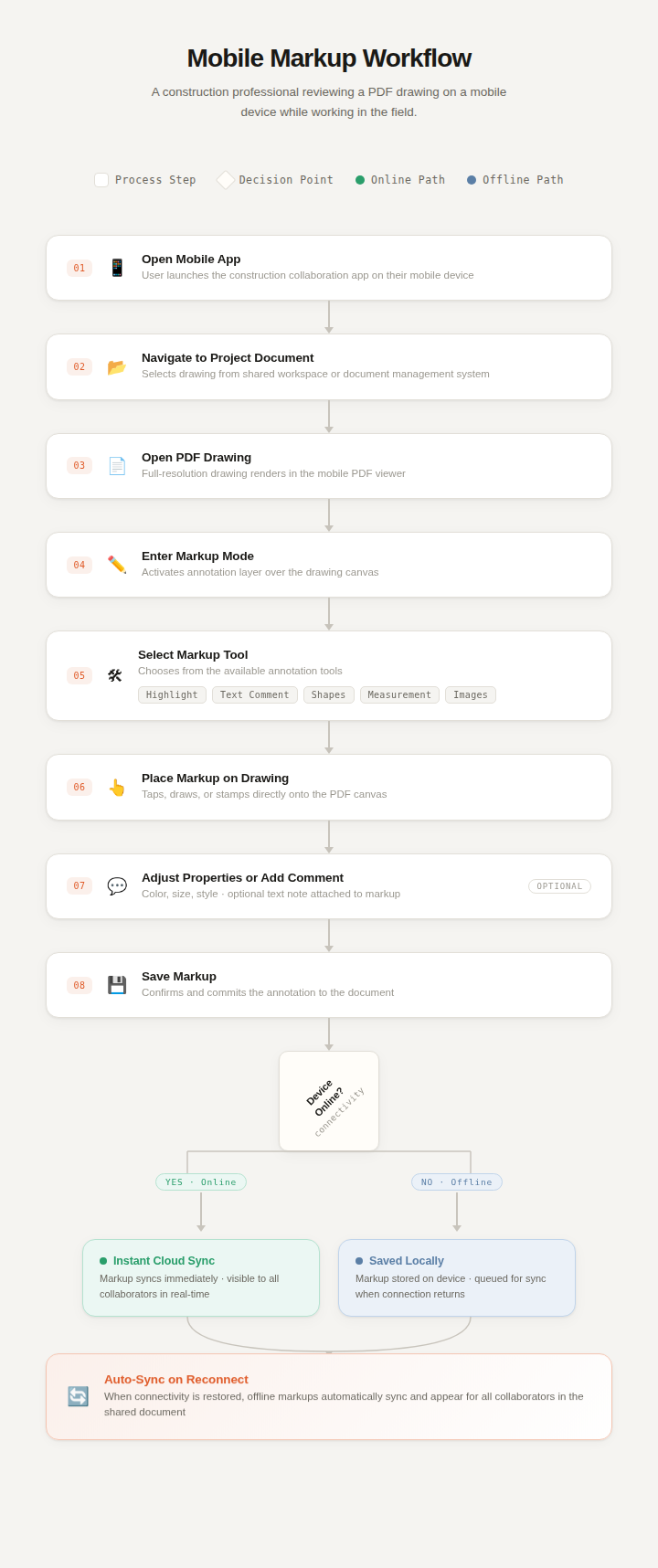
Designing for Real-Time Collaboration
A major area of focus was enabling users to collaborate on PDFs through Studio Sessions, where multiple participants can view and comment on documents simultaneously.
Design considerations included:
- Clear visibility of shared annotations
- Real-time updates across participants
- Commenting workflows that work well on smaller screens
- Maintaining clarity in dense markup environments
These capabilities allowed teams across the jobsite and office to stay aligned without needing to return to a desktop workstation.
Building Mobile Design Systems
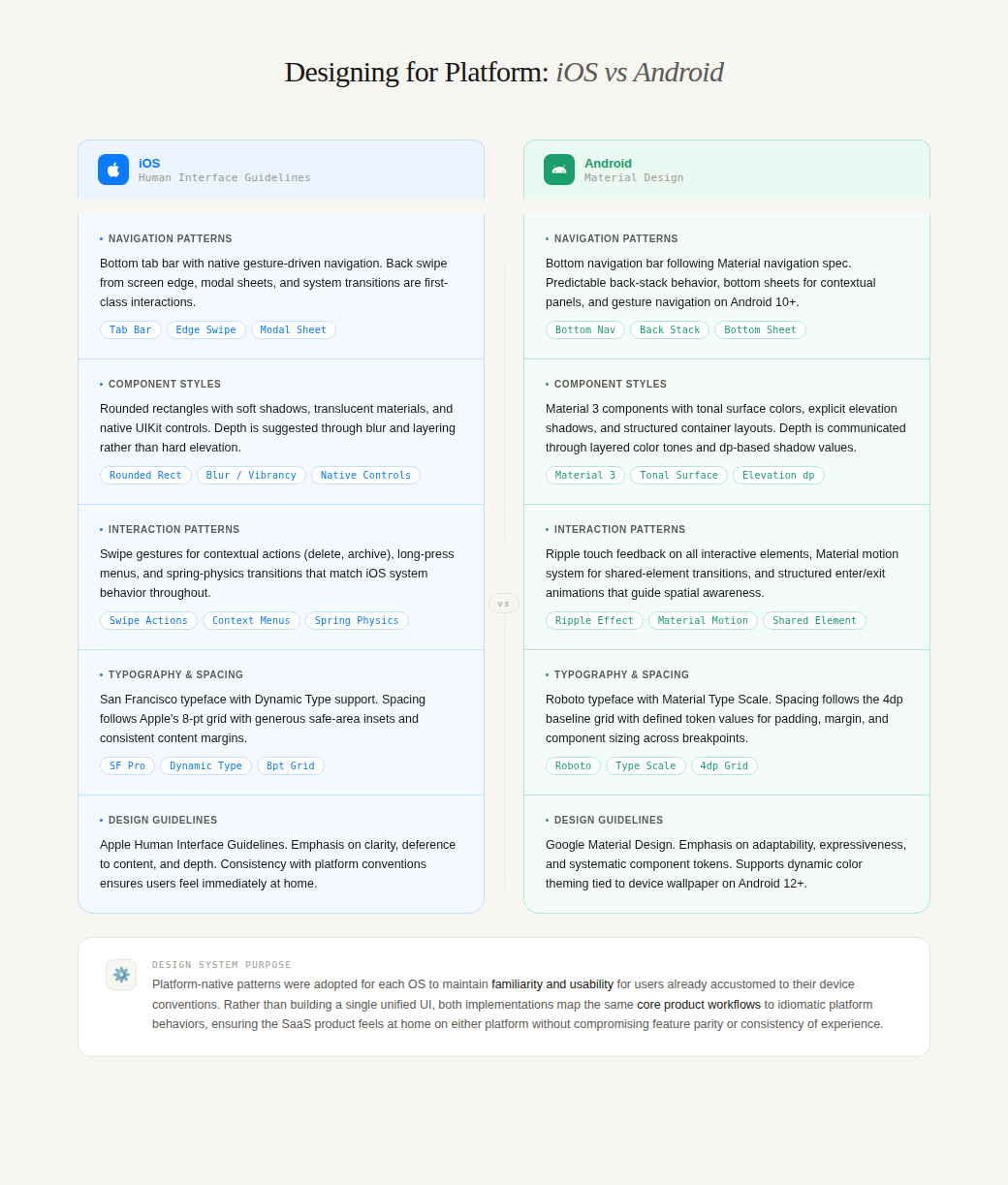
To ensure scalability and consistency, we helped establish dedicated mobile design systems for both platforms.
These systems were built using:
- Apple Human Interface Guidelines for iOS patterns
- Material Design for Android conventions
The systems included:
- Shared components
- Platform-specific interaction patterns
- Typography and spacing standards
- Interaction guidelines for markup tools
This allowed the team to move faster while maintaining platform-native experiences.
Expanding to Android (0 → 1)
When I joined Bluebeam, the company only had an iOS mobile app. Over time, demand from customers led to the decision to build an Android application from the ground up.
Supporting this effort required:
- Defining platform-specific UX patterns
- Establishing a scalable Android design system
- Adapting existing workflows to Material Design standards
- Ensuring parity in core capabilities while respecting platform conventions
Launching Android significantly expanded access to Bluebeam’s mobile capabilities for customers who relied on Android devices in the field.
Hands-On Design Contributions
While my primary role was leadership, I frequently stepped in to contribute directly to design work when the mobile workload increased.
This included:
- Designing workflows for markup and commenting interactions
- Supporting offline document experiences
- Contributing to design system components
- Creating flows and interaction patterns for new features
Maintaining hands-on involvement allowed me to stay close to the product and support the team during critical delivery periods.
Impact
The evolution of Bluebeam’s mobile experience helped make document collaboration more accessible to users working in the field.
Key outcomes included:
- A more focused mobile experience centered on documents and collaboration
- Support for real-time markup collaboration through Studio Sessions
- Launch of the Android mobile application
- Scalable design systems for both iOS and Android
Together, these improvements helped extend Bluebeam’s core value, PDF collaboration, beyond desktop and into the environments where many users actually work.